How to Download Kotatsu APK Latest Version for Android

2026-10-09
A step-by-step guide to the Kotatsu APK download on Android, from a safe source to installing the app, enabling manga sources, and fixing common errors.
Kotatsu is a free, open-source manga reader for Android, and this guide walks you through the whole thing: where to get the Kotatsu APK download safely, how to install it, how to set up your sources, and how to fix the errors that trip people up on the first run. If you've been hunting for a clean way to read manga on your phone without a pile of sketchy streaming sites, this is for you.
The Kotatsu Android APK does one job well. It pulls manga from more than 1,200 built-in online sources, then gives you a reader that handles long-strip webtoons and standard pages in the same app. Everything else - your library, your history, your offline downloads - lives in one place.
Before you start, know what you're getting into. Kotatsu doesn't ship with content. It ships with sources, and you have to turn them on yourself. That one step is where most people give up. Don't.

Kotatsu is a manga reader app for Android that lets you discover, read, and save manga from many online catalogs.
What You Need Before the Kotatsu APK Download
Preparation takes two minutes, and skipping it is why installs fail later.
- Check your Android version. Kotatsu runs on Android 6.0 and up. Anything older won't install.
- Free up space. Budget a few hundred megabytes so the app and your first chapter cache both fit.
- Allow installs from your browser. Your phone blocks sideloaded apps by default, and you'll have to flip that on.
- Pick a source of the file you trust. More on that in the next section.
You don't need root. You don't need a modded build either, no matter what a random forum tells you.
Step 1: Download Kotatsu Latest Version from APKPure
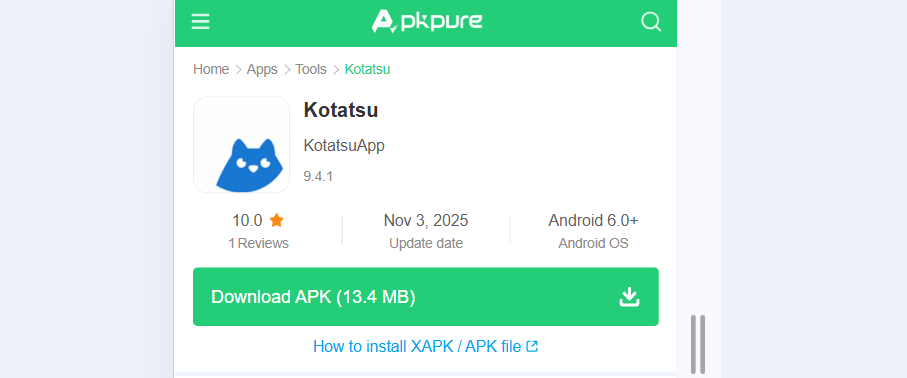
The safest Kotatsu APK download comes from a store page you can inspect before you tap the button. APKPure hosts Kotatsu with its version history, file size, and permission list laid out on one page, and you can check all three in the time it takes a kettle to boil.
- Open the Kotatsu APK detailed page on APKPure.
- Then grab the download.
Step 2: Enable Installation From Unknown Sources
Android will block the install until you allow it, and the wording changes depending on your version.
- Open Settings on your phone.
- Go to Apps or Security, depending on your Android version.
- Find Special access or Install unknown apps.
- Locate the app you're downloading from, usually Chrome or your file manager.
- Toggle Allow from this source on.
On Android 8.0 and later, you grant this per app, not globally, which is the better design. It means your browser can install Kotatsu while everything else stays locked down. Flip it off again once you're done, if you want the belt and suspenders.
Step 3: Install the Kotatsu Android APK
Find the file in your notifications or your Downloads folder and tap it.
- Tap the
.apkfile to start the install. - Read the permission prompt. This is your last chance to catch a bad build.
- Tap Install and wait a few seconds.
- Tap Open when it finishes.
If Play Protect throws a warning, that's normal for any app installed outside Google Play. You can review the details and proceed. Kotatsu is open source, so the code behind that warning is public.
Once it opens, you'll land on an empty home screen. That's expected. There's nothing to read yet because no sources are turned on.
Step 4: Turn On Sources in Kotatsu
This is the step people miss, and it's the one that makes or breaks the app.
- Open the side menu and tap Sources.
- Tap the three-dot menu and pick Enable all, or hand-pick the ones you want.
- Wait while Kotatsu loads each source. A full sync of 1,200+ sources takes a minute or two.
- Go back to the home screen and pull down to refresh.
You don't need every source. Enable a dozen you'll actually use, and the app stays fast. Turning all of them on gives you the widest catalog at the cost of slower startup, so it's a trade you make on purpose, not by accident.
Titles from a source that's down will show as broken. Kotatsu flags them, and you can hide the dead ones from your library instead of letting them clutter your list.
Step 5: Read, Download, and Track Your Manga
Now the app earns its keep.
Search pulls results from every enabled source at once, so one query beats opening a dozen tabs. Add what you like to your library, and organize it into your own categories instead of fighting a single flat list. Start a chapter, and Kotatsu keeps your place, so you come back to the right page even weeks later.
For offline reading, tap download on a chapter and Kotatsu stores it locally. That's the feature that matters on a plane or a subway, and it works on chapters from any source you've enabled. You can also open third-party CBZ archives you already own, which makes Kotatsu a local library as well as an online one.
If you track your reading on Shikimori, AniList, MyAnimeList, or Kitsu, link the account in settings and your progress syncs both ways. You can also run the optional sync server to move your library and history between devices.
Tips for Getting More Out of Kotatsu
A few things that separate a smooth setup from a frustrating one.
- Enable only the sources you need. Startup time scales with source count, and a lean list of twenty loads far faster than all of them.
- Set your reader direction early. Manga reads right to left, webtoons read top to bottom, and Kotatsu handles both. Pick the mode that matches what you're reading and it stops fighting you.
- Turn on new chapter notifications. The updates feed tells you when a title you follow drops a new chapter, so you stop refreshing manually.
- Lock the app. Kotatsu supports password and fingerprint protection, which is handy if you share a phone.
- Download chapters in batches when you're on Wi-Fi. Queued downloads keep going in the background, so stock up before you leave.
Kotatsu is a manga reader app for Android that lets you discover, read, and save manga from many online catalogs.
- How to Download 3D Driving Class APK Latest Version 36.64 for Android 2026
- How to Download PureStatus: ByeBye Blur Status APK Latest Version 2026.22 for Android 2026
- How to Download Chợ Tốt: Chuyên mua bán Online APK Latest Version 5.50.0 for Android 2026
Troubleshooting Kotatsu APK Problems
Things go wrong. Here's what to do when they do.
The app installs but shows no manga. You haven't enabled any sources. Open Sources from the side menu and turn on the ones you want, then refresh the home screen.
A source loads nothing or shows broken titles. That source is down or has changed its layout. Hide it and switch to another, since running one dead source won't break the rest of the app.
The APK won't install at all. You skipped the unknown sources step, or the file is incomplete. Re-check the download size against the listing, delete the partial file, and grab it again.
Reading progress isn't syncing. The local sync server isn't running, or your tracking account isn't linked. Check the connection in settings, and confirm the server address if you're hosting your own.
Kotatsu feels slow on startup. Too many sources are enabled. Cut the list down to the ones you actually read, and the delay drops.
Where to Get Kotatsu APK Downloads Going Forward
The Kotatsu APK download you grab from APKPure comes from a page that tracks each release, so when a new version lands, you can grab it there and install over the old one without losing your library or your reading history.
Reading manga on Android shouldn't mean juggling ten sites and losing your place every time. Start with the Kotatsu APK download from a source you can verify, enable a few sources, and you've got one app that handles search, reading, offline downloads, and tracking together. Set it up once, and it just works.
 NEWS
NEWS REVIEWS
 HOWTO
HOWTO